AstroTools
A Windows companion for your astrophotography night. AstroTools reads your equipment data from N.I.N.A. (Advanced API plugin) and Pegasus Unity, records it all night long and plots the session.
Goal: V1 Beta, stable and usable by others, by the end of 2026.
Where we are (6 November 2026): version 0.8.0. All the pieces of V1 are done and tested, including graphs built with the mouse (over time and scatter plots). Next step: a real night on other equipment, run by someone other than the author.
What V1 does
- Describes your equipment (scopes, reducers, cameras, eyepieces, filters, mounts) and computes the basics: focal length, f-ratio, image scale, field of view.
- Lists every device and value exposed by N.I.N.A. and Pegasus Unity, and lets you pick and describe the fields to record.
- Records the selected fields at a fixed rate all night, and survives source outages (tested through a full power cut).
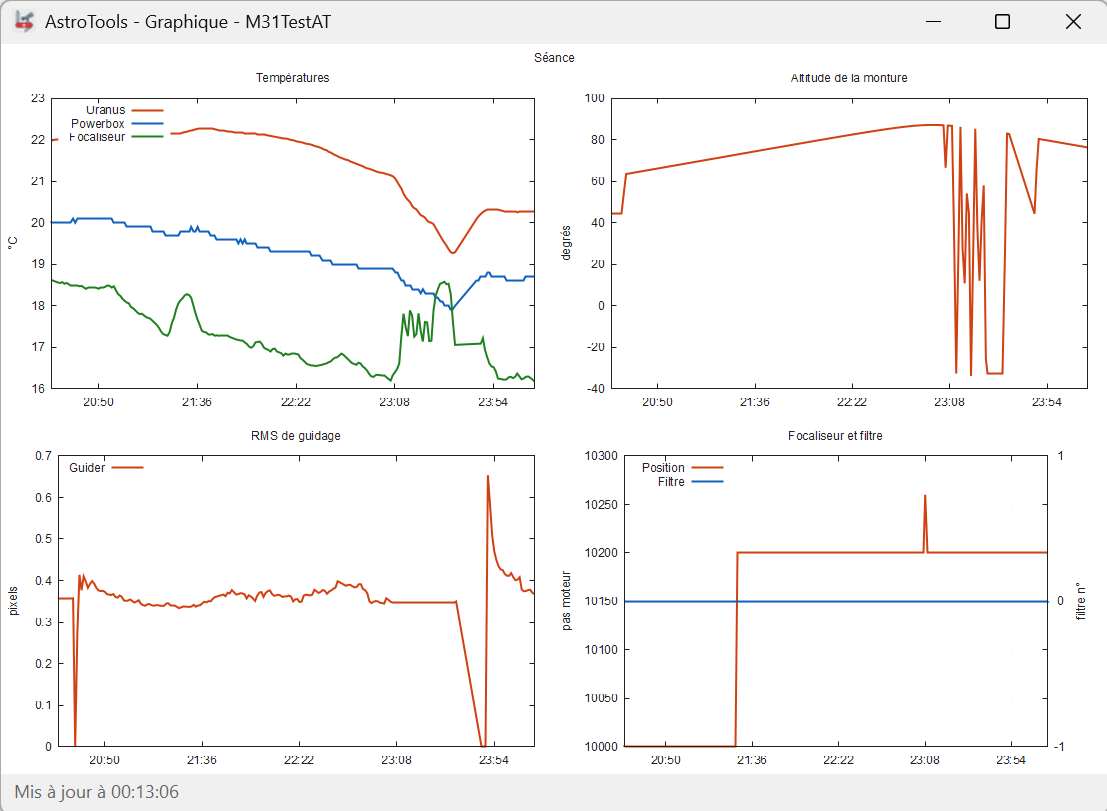
- Plots the session: temperatures, mount altitude, guiding RMS, focuser position and filter.
- Records each image saved by N.I.N.A. with its statistics, and the N.I.N.A. events of the night.
- Shows thumbnails of the session images, with a simple FITS viewer.
- Graphs of your choice, built with the mouse, Y = f(t) and Y = f(X), saved, reused and followed live during the night.
AstroTools only reads: it never drives your equipment. N.I.N.A. stays in charge.
Roadmap
AstroTools grows in layers: each version reuses the engine of the previous one.
| Version | Theme | In one sentence |
|---|---|---|
| V1 | in the field | collect, record and show the raw data of the APIs during the night |
| V2 | replay | replay a recorded night as if it were live: timeline, play, pause, speed ×N, graphs and images moving together |
| V3 | offline analysis | measure the FITS images of a finished session (HFR, FWHM, SNR…) and plot these measures like any other variable |
| V4 at the earliest | dashboard | gather the views into one dashboard |
V1, step by step
| Step | Content | State |
|---|---|---|
| 1 | equipment, editor, calculations | done |
| 2 | Pegasus Unity and N.I.N.A. sources, field selection | done |
| 3.1 | periodic recording, session graph | done |
| 3.2 | images and N.I.N.A. events (WebSocket) | done |
| 3.3 | image thumbnails of the session and simple FITS viewer | done |
| 4 | graphs built without code, Y = f(t) and Y = f(X), saved, reloaded and followed live: this is V1 | done |
| V1 validation | at least one full real night under the sky, on equipment other than the author's, run by its owner with the quick start guide | next |
| Stable V1 Beta (end of 2026) | review of the ideas set aside, then one step with those kept. Criterion: AstroTools can be used by someone else, on a real night, without help | to do |
| Manual | complete user manual in French and English | to do |
From V1 on, every version is numbered and published with its zip, so you always know which version you run.
Rules for every version
- AstroTools only visualises; it never drives the equipment.
- No heavy calculation during an acquisition: reliability of the recording comes first. Image analysis runs offline.
- Out of scope: stacking and image processing.
How AstroTools is developed
AstroTools is written by an amateur astronomer working with two AI assistants, each with a clear role.
- Michel Fabre: owner of the project. He decides the scope, answers the design questions and tests every step on his own equipment.
- Claude (Anthropic): development, integration, tests, user manual.
- ChatGPT (OpenAI): specification drafts and independent review of the design documents.
One step at a time
Development goes in small increments and sub-increments (1, 2-1, 2-2, 3.1…), each one fully tested before the next one starts:
- Specify before coding. Each step gets a written specification, reviewed by the second assistant, corrected, then validated by Michel.
- Code. C# / .NET 8, Windows Forms, versioned on GitHub, one pull request per step.
- Automated tests and simulator. Each step comes with automated tests, and a built-in source simulator replays recorded N.I.N.A. and Pegasus responses, so outages and error cases can be tested again and again without the equipment.
- Test on real equipment. A detailed test plan is run by Michel on his real setup, including full real nights (and one general power cut). A step is only merged when its whole test plan passes.
- Document. The user manual gets its chapter for the step before it is closed.
Principles
- Reuse the existing bricks rather than rewrite them; one validated brick at a time.
- Raw data first: in V1 AstroTools computes nothing on the measures, it trusts the values given by N.I.N.A., Pegasus and PHD2.
- Recording never depends on display: if a graph window fails, the acquisition goes on.
- Any new idea must bring V1 closer to its goal, otherwise it goes to a "later" list, reviewed once V1 is validated.
Requirements
- Windows 10 or 11, 64-bit. No installation needed: unzip and run.
- N.I.N.A. with the Advanced API plugin, and/or Pegasus Unity.
- gnuplot for the graphs.
Known limitations
- Interface in English and French; changing the language needs a restart of AstroTools (the colour theme changes live).
- All technical data (field names, files, log) are in British English, whatever the interface language.
- Thoroughly tested only on the author's own equipment: Pegasus Ultimate Powerbox v3 and Uranus through Pegasus Unity, N.I.N.A. with the Advanced API plugin. Other devices should work as long as N.I.N.A. or Unity exposes them, but have not been tested.
- Windows only. No installer yet: the program is delivered as a zip folder.
- The user manual exists in French only for now.
Download
Versions will be published here from V1 on.
User manual
- Manuel utilisateur (français)
- User manual (English): coming soon
Credits
- Tom Palmer (@tcpalmer), whose Session Metadata plugin for N.I.N.A. gave the original idea.
- Christian Palm, author of the N.I.N.A. Advanced API plugin that AstroTools relies on.
Questions, bugs, ideas: astrotools@michelfabre.ch